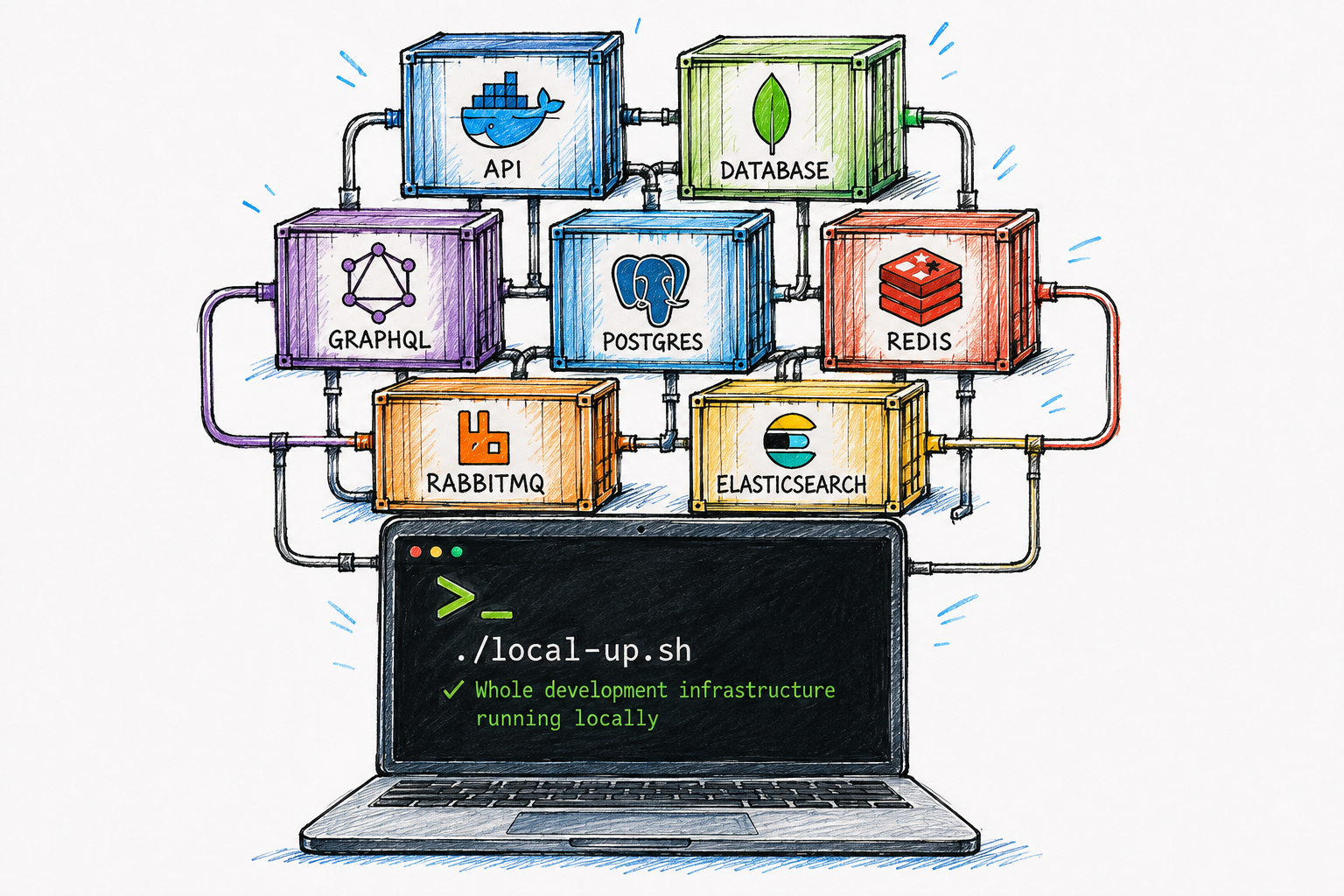
The examples use a fictional e-commerce platform. Service names, databases and numbers are illustrative.
Most teams with a service-oriented backend end up with one shared test environment: one deployment of every service, one database, one message broker, one copy of everything. It works until two people need it at the same time, or until one person's perfectly reasonable database change becomes another person's failing test.
The fix we landed on was not a new platform or a new tool. It was a shell script in the repository that brings the entire infrastructure up on a laptop in about 90 seconds. This article is about how that script is put together, what it has to get right, and what turned out to matter most.
Start by writing down what "the environment" is
Before you can put an environment on a laptop you have to be honest about what is in it. For our fictional shop, the shared test environment looks like this.
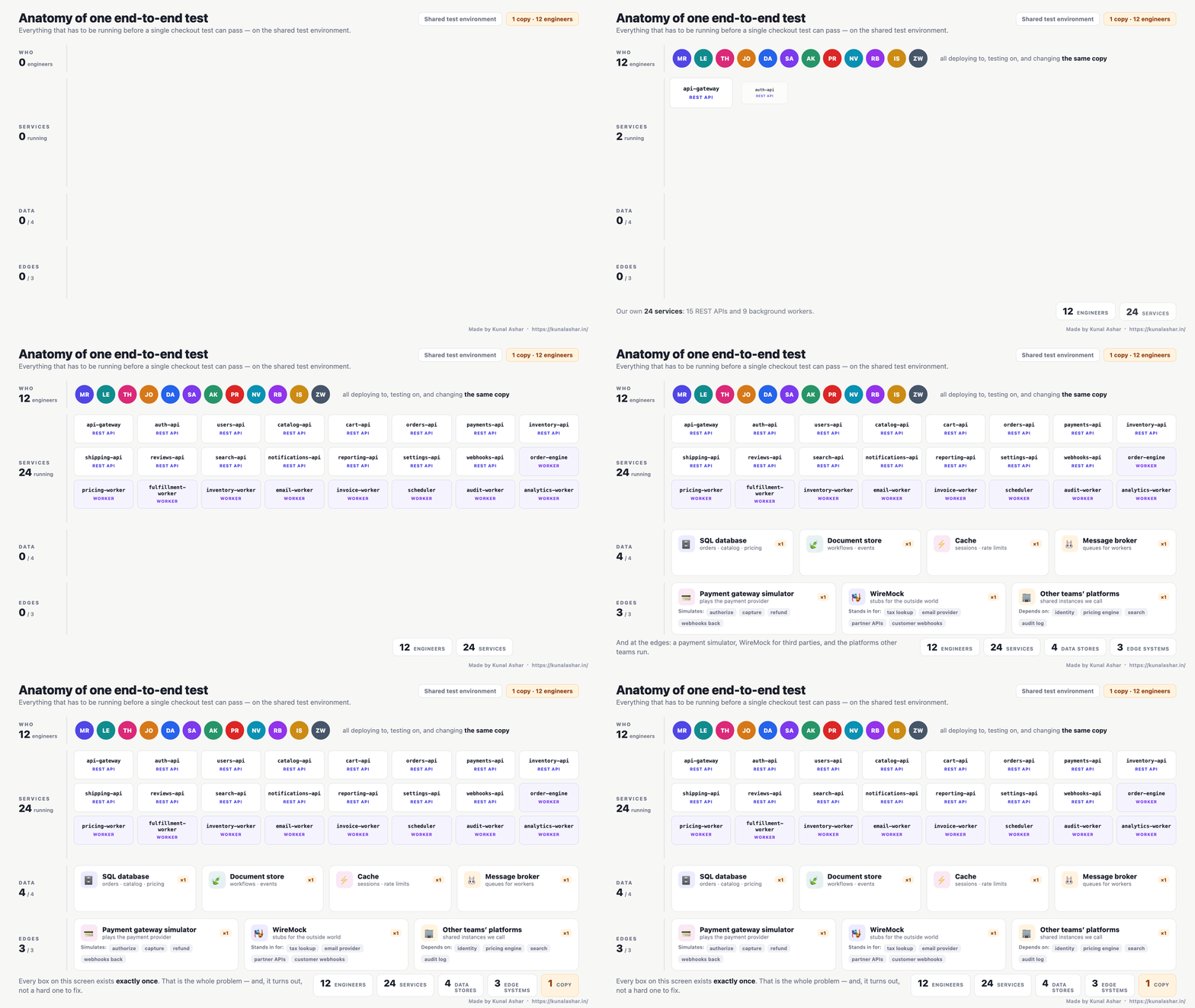
- Four data and queueing systems: a relational database, a document store, a cache and a message broker.
- Two gateways that stand in for the outside world: a simulator that plays the payment provider, and WireMock stubbing third-party APIs and the customer's webhook endpoints.
- A handful of platform services owned by other teams that ours call.
- Two dozen deployables of our own, roughly two thirds REST APIs and one third background workers.
On paper that sounds expensive to duplicate. It turns out not to be: every item in the first two groups already ships as a container image or can be built as one. The services are just processes you start when you need them. The only things that cannot live on a laptop are other teams' platforms, and those you either stub or point at their shared instance.
The shape of the solution
One command:
./scripts/local-up.shAbout 90 seconds later the database, the document store, the cache, the broker, the payment simulator and WireMock are running locally, the schema is applied, the test tenant is seeded, and a banner prints the endpoints. You start only the two or three services your feature needs, run any test suite, and when you want a clean slate, docker compose down -v and run it again.
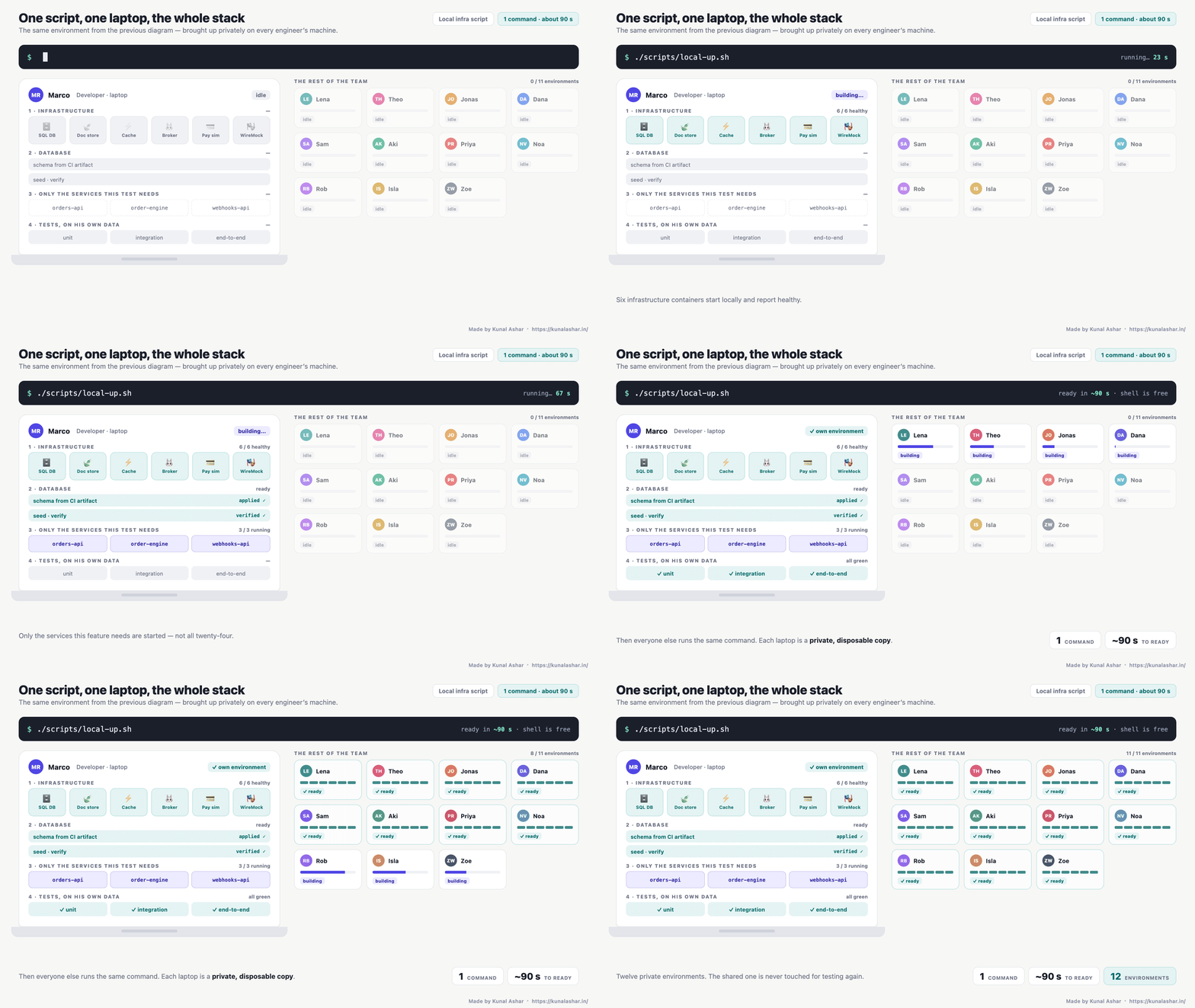
The important property is not speed, it is isolation. Every engineer can change their own database, wipe their own tables, deploy a half-finished branch, and nobody else notices. The shared environment stops being where people test.
What the script actually does
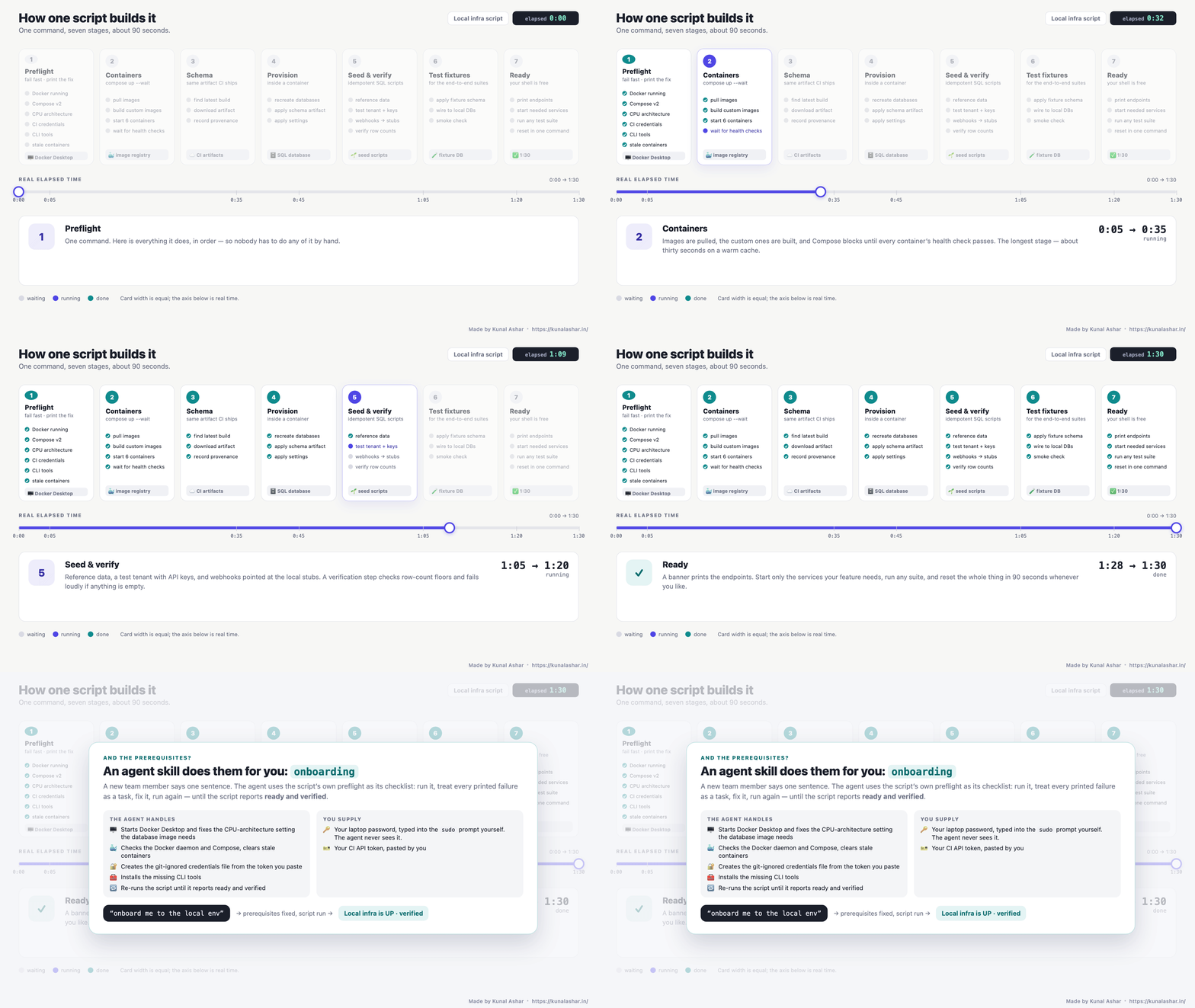
"One script" can hide a lot. Here is ours, stage by stage, with a real elapsed clock.
1. Preflight, and fail with the fix
The script starts by checking everything the later stages assume: the Docker daemon is reachable, Compose v2 is installed, the CPU-architecture setting the database image needs is enabled, CI credentials exist, the small CLI tools are present, and there is no half-initialised database container left over from a previous run.
Every check prints the exact remedy when it fails:
pf() { echo "✗ $1"; echo "  fix: $2"; FAIL=1; }

docker info >/dev/null 2>&1 \
  || pf "docker daemon not reachable" "start Docker Desktop, then re-run"

docker compose version >/dev/null 2>&1 \
  || pf "compose v2 missing" "update Docker Desktop (Compose v2 ships with it)"

[[ -f scripts/local/.ci.env ]] \
  || pf "CI credentials missing" "create scripts/local/.ci.env with CI_USER / CI_TOKEN (git-ignored)"

[[ -n "$FAIL" ]] && exit 1
Every line in that block exists because someone hit that exact failure on their first run. Treat each new first-run failure as a missing check, and within a few weeks the preflight becomes the onboarding document.
2. Containers, and wait for healthy
docker compose -f scripts/local/docker-compose.yml up -d --build --waitThree details in that one line did a lot of work. --build rebuilds the two images we customise (the payment simulator and the broker with its queues and plugins), so config edits are never silently ignored. --wait blocks until every container's health check passes, so the next stage never races a database that is still starting. And the compose file gives every service a real health check:
services:
  sqldb:
    image: <your-sql-image>
    ports: ["5433:1433"]
    healthcheck:
      test: ["CMD", "sh", "-c", "sqlcmd -S localhost -U sa -P \"$$SA_PASSWORD\" -Q 'SELECT 1' -C"]
      interval: 5s
      retries: 30
  broker:
    build: ./broker          # custom image: queues, vhosts, plugins baked in
    ports: ["5672:5672", "15672:15672"]
  cache:
    image: redis:alpine
  docstore:
    image: mongo:7
  wiremock:
    image: wiremock/wiremock:3.13.0
    ports: ["8888:8080"]
    volumes: ["./wiremock:/home/wiremock"]
  pay-sim:
    build: ./pay-sim         # plays the payment provider: authorize, capture, refund
    ports: ["9100:9100"]
This is the longest stage, around thirty seconds on a warm image cache.
3. Schema comes from CI, not from a hand-written script
The single most important design decision: the local database is provisioned from the same schema artifact that CI builds for the shared environments. The script downloads that artifact from the last successful build on the target branch, writes a small provenance file next to it so you can always tell which build you are running, and hands it to the next stage.
Two consequences follow. Local and shared can never drift, because they are built from the same thing. And a schema change goes through a pull request and a build, then reaches every laptop the next time its owner re-runs the script. Nobody edits a shared database by hand to get a new column.
4. Provision inside a container
The schema tool runs in a container too, so nobody needs a database SDK on their machine:
docker run --rm --network host -v "$PWD/scripts/local/db:/db" <schema-tool-image> \
  apply --target "Server=localhost,5433;Database=AppDb;User Id=sa;Password=$SA_PASSWORD" \
        --artifact /db/artifacts/AppDb.schema
We drop and recreate the target databases on every run. It is slower than an incremental apply by a few seconds and removes an entire class of "works on my machine" problems.
5. Seed, then verify
Thirty-odd SQL files, numbered so they run in order, load reference data, pricing, provider configuration, and a test tenant with its API keys. One of them repoints every outbound webhook URL at the local WireMock, so end-to-end tests never call anything real.
Then a verification script checks row-count floors on the tables that matter and fails loudly if any are empty:
IF (SELECT COUNT(*) FROM Tenants WHERE Name = 'test-tenant') < 1
  THROW 50000, 'VERIFY FAILED: test tenant missing', 1;
IF (SELECT COUNT(*) FROM PaymentConfig) < 1
  THROW 50000, 'VERIFY FAILED: payment config missing', 1;
PRINT 'VERIFIED';
That final VERIFIED line is the done-signal for the whole script. If you do not see it, the environment is not ready, whatever the containers say.
6. End-to-end fixtures on top
Our end-to-end suites talk to a separate fixture database. It is applied on top of the main ones and its views are regenerated to point at the local copies. Your equivalent might be a fixtures schema, a seed for the test runner, or nothing at all.
7. The ready banner
The last thing the script prints is the list of endpoints and the two commands people actually need next:
Local infra is UP. Containers run in the background; this shell is free.
SQL DB localhost:5433 Broker localhost:5672
WireMock localhost:8888 Pay sim localhost:9100
Run any service: dotnet run --project src/Orders.Api
Run tests: dotnet test --settings local.runsettings
Reset everything: docker compose -f scripts/local/docker-compose.yml down -vBecause the preflight prints a remedy for every failure, the first run on a fresh laptop needs no separate onboarding document. We gave the same checklist to an AI coding agent: a new joiner asks it to onboard them, it runs the script, fixes each printed failure in turn, and re-runs until it sees the banner and the VERIFIED line.
Stubbing the outside world
A laptop is only a complete environment if nothing in a test path needs the real internet.
- The payment provider is a simulator. A small container that speaks the provider's API, accepts any card number ending in an even digit, declines odd ones, and emits webhooks back to the platform. It makes checkout tests deterministic and fast.
- Everything else is WireMock. Tax lookups, the email provider, partner APIs, and the customer's own webhook endpoint. Stubs are checked into the repository under
scripts/local/wiremock/, and the seed step points the platform at them. - Other teams' platforms are the one thing we do not run locally. Where a stub is good enough, WireMock again. Where it is not, the service points at that team's shared instance, and we accept that this one dependency is not isolated.
How we will know it worked
A faster script is not the goal. The goal is that features stop waiting on a shared environment, so we did not invent new metrics for this. We picked two that most engineering teams already track and watched their direction, so the result shows up where people already look.
Lead time for changes ↓. Time from In Progress to Done for the team's tickets. We watch the 75th percentile rather than the median, because contention for a shared environment does not slow every ticket a little. It slows some tickets a lot, and that shows up in the tail. The median was already improving for other reasons, so we hold ourselves to the tail. This is the primary metric, and it moves slowly, on the order of a quarter.
Flaky test rate ↓. The share of automated test runs that produce inconsistent results unrelated to the code under test. From the pipeline's point of view, a test that failed because someone else changed a row in the shared database is a flaky test. Moving test runs onto isolated laptops should remove that whole category rather than shrink it. This is the leading indicator because it moves with every run, not every quarter.
What we expect to follow. Commit-to-deploy time should shorten, because the first time code meets a real database is now before the push rather than after it. Change failure rate should fall for the same reason. We treat both as confirmation rather than targets.
What we deliberately did not measure. Script run time, container start time and number of laptops with the environment installed. All three are easy to report and none of them tells you whether anyone's work got faster. The 90-second figure is a property of the tool, not an outcome.
What turned out to matter
- Inventory first. Write down everything that has to be up for one test. It is a longer list than you think and a shorter one than you fear.
- Schema from CI. Provision every environment, local or shared, from the same artifact. It ends drift and it ends hand-edited shared databases.
- Stub the edges. Simulators and WireMock are what make a laptop complete rather than partial.
- Health checks and
--wait. Racing a starting database is the most common flaky-setup bug and the easiest to eliminate. - Preflight with fixes. Every failure prints its remedy. Every new failure becomes a check.
- Optimise for the reset. If a clean rebuild takes 90 seconds, people experiment freely. If it takes an afternoon, they nurse a fragile environment for months.